Understanding ISBNs
Stepping into the world of self-publishing means making important decisions about your book’s identity—and few are as foundational as the ISBN. This little number holds the key to your book’s distribution, findability, and professional reputation. In this blog post, I’ll break down exactly what an ISBN is, why you need to care, and the pros and cons of using a free ISBN versus buying your own.
What Exactly Is an ISBN?
The ISBN, or International Standard Book Number, is a unique 13-digit identifier for your book. Its primary function is to give a specific edition and format of a book a worldwide, unique identification. Crucially, each version of your book requires its own ISBN. This means the paperback, hardcover, ebook, and audiobook versions each need a separate number.
Why ISBNs Matter for Authors
ISBNs make professional, cohesive distribution possible.
They are the key that allows your book to be findable in global databases, bookstores, and libraries. Without an ISBN, your book is essentially invisible to the book industry's established channels.
While ebooks sold exclusively on Amazon use an internal ASIN (Amazon Standard Identification Number), ISBNs are required for all print books and for distributing ebooks on other platforms.
Do You Really Need an ISBN?
ISBNs are required for all print books. Amazon offers them for free when you’re publishing your book on their site; it’s easy to assign the ISBN during the setup process. But it’s not necessarily the best option, depending on your publishing goals. For example, if you’d like to make your book available to retailers and libraries via IngramSpark or another platform with wider distribution, you’ll need your own ISBNs.
ISBNs are optional for ebooks sold only on Amazon. Amazon does not offer free ISBNs for those, so if you want one, you’ll have to purchase one. While you can technically skip a paid ISBN for an Amazon-only ebook, buying your own ISBNs equals professionalism, security, and long-term flexibility.
Free ISBN vs. Buying Your Own: Pros and Cons
One of the biggest decisions you’ll face is whether to use the free ISBN offered by Amazon KDP or to purchase your own. The below table should help you compare free versus paid options.
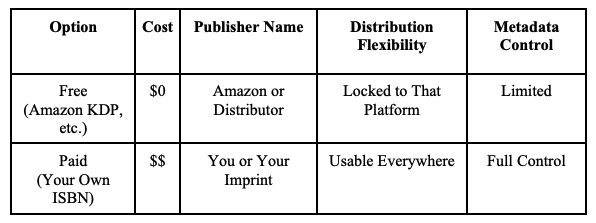
Fig. 1. Comparing free vs. paid ISBNs
How to Decide: Free vs. Paid ISBN Checklist
When trying to decide between a free Amazon ISBN and a paid ISBN, ask yourself these two questions:
Do you want to publish beyond Amazon for bookstore and library distribution (e.g., via IngramSpark), either now or potentially in the future?
You’ll need your own ISBN to do this. Starting with one from the beginning will ensure your sales data from Amazon and any other platforms is linked via the shared ISBN.
Do you want your own imprint listed as the publisher?
Without your own ISBN, Amazon (not you) will be considered the publisher of record.
If you’ve answered yes, it’s better to purchase your own ISBNs. However, if the answer is no, you’re probably fine using Amazon’s free ones.
Where to Get ISBNs in Major Markets
Always buy your ISBNs from your official national agency. Avoid resellers—ISBNs cannot be legally "resold."
Country: United States
Official Agency: Bowker Identifier Services
Typical Cost: $125 for one, $295 for ten
Country: Canada
Official Agency: Library and Archives Canada
Typical Cost: free for Canadian authors
Country: United Kingdom
Official Agency: Nielsen ISBN Store
Typical Cost: Varies
Country: Australia
Official Agency: Thorpe-Bowker Identifier Services
Typical Cost: Varies
Country: Europe and Beyond
Official Agency: ISBN International Directory
Typical Cost: Varies
How to Buy and Assign ISBNs Through Bowker (U.S. & Australia Walkthrough)
Here is a practical step-by-step guide on how to buy and register ISBNs for U.S. and Australian authors using the Bowker system:
Create Your Account: Go to myidentifiers.com, click “My Account,” and “Register”. Use your imprint or publishing business name, as this will appear as the publisher of record.
Purchase ISBNs: Choose the quantity you need (e.g., 10 ISBNs for $295). Most authors start with 10 since each format requires a unique ISBN.
Access Dashboard: After purchase, navigate to My Identifiers, then Manage ISBNs.
Assign Title: Select an unused ISBN and click Assign Title. Fill in your book’s details (title, author, format, publisher name, price, etc.).
Add Metadata: Enter essential data like BISAC categories and keywords thoroughly, as this information feeds into retail and library databases.
Generate Barcode: You don’t need to purchase a barcode. Instead, use a reliable free option like the Free Barcode Generator by Bookow to create a scannable image for your print cover. Upload this image to your cover design. (Note: If we are doing a publishing package together, you can skip this step, as we will generate the barcode for you!)
Add to Files: Include the ISBN on the copyright page and spine. Use it consistently on all publishing platforms.
Verify Publisher Name: Ensure the publisher name you entered in Bowker is consistent with your imprint and will appear publicly as intended.
Changing from a Free ISBN to Your Own Later
If you start with a free ISBN and decide to buy your own for wider distribution later, you can't transfer the old number—it's permanently tied to the platform that gave it to you (like Amazon or Draft2Digital). That’s why we recommend starting with your own from the beginning if you think wider distribution may be in your future.
However, you can release a new edition with your own ISBN by following these steps:
Buy your new ISBN.
Create a new edition in KDP or IngramSpark using that number.
Update your copyright page and cover.
Unpublish or redirect from the old version.
Note: Reviews and rankings generally won't carry over automatically, so plan your timing carefully.
Common Mistakes Authors Make with ISBNs
Avoid these pitfalls to ensure a smooth publishing process:
Using one ISBN for multiple formats (e.g., using the paperback ISBN for the hardcover).
Forgetting to register your book's metadata (details, categories).
Listing inconsistent publisher names across platforms.
Misplacing or trying to reuse or transfer ISBNs.
ISBNs and Imprints: Building Your Publishing Brand
ISBN ownership is the foundation of professional credibility. When you own your ISBNs, they identify you as a publisher, not Amazon. Securing your own ISBNs is a great first step toward establishing your own imprint and building your publishing brand.
Answers to Common ISBN Questions
Here are some quick answers to some of the most common questions new authors have about ISBNs:
Do ebooks need ISBNs? Yes and no. They’re optional on Amazon but necessary for wide distribution.
Can I reuse or transfer ISBNs? No. Once assigned, they are permanent and cannot be reused or transferred.
What happens if I change my title or subtitle? Major changes usually require a new ISBN, so think carefully before registering and make sure that all major details are final.
Can I use the same ISBN for my paperback, my ebook, and my hardcover edition? No. Each format requires its own unique ISBN.
ISBNs Help You Take Ownership of Your Book’s Identity
ISBN ownership is the first great step toward establishing your own publishing imprint and building your publishing brand. It gives you control, visibility, and credibility. When you own your ISBNs, you—not Amazon or another distributor—are identified as the publisher, and the book is truly your own.
While it’s ultimately an individual choice, if it’s within your means, it’s always better to register your own ISBNs so you have full ownership over your creative work and aren’t dependent on a platform, which can potentially block or delete your book—and all its sales data—at any moment. I’ve seen it happen to authors, and it’s always devastating.
Think long-term about your distribution and branding. Taking ownership of your ISBNs means taking control of your book’s future and ensuring no single platform controls your work.